
The wrong navigation app can cost you time, sanity, and gas money. Waze vs Google Maps isn’t a trivial choice anymore, as both apps own real estate on millions of phones, both promise to get you there faster, and yet they approach routing like two entirely different people with a GPS.
Here’s what the data actually shows when you strip away the marketing: Waze is obsessed with shaving minutes off your commute through aggressive rerouting and real-time crowd intel. Google Maps prioritizes getting you somewhere without constant detours, plus it handles walking, transit, and browsing restaurants like a boss. One isn’t objectively “better”—but one will almost certainly feel better depending on how you drive and where you drive.
Let me walk you through the real differences.
1. Waze Driving App: Speed and Real-Time Alerts
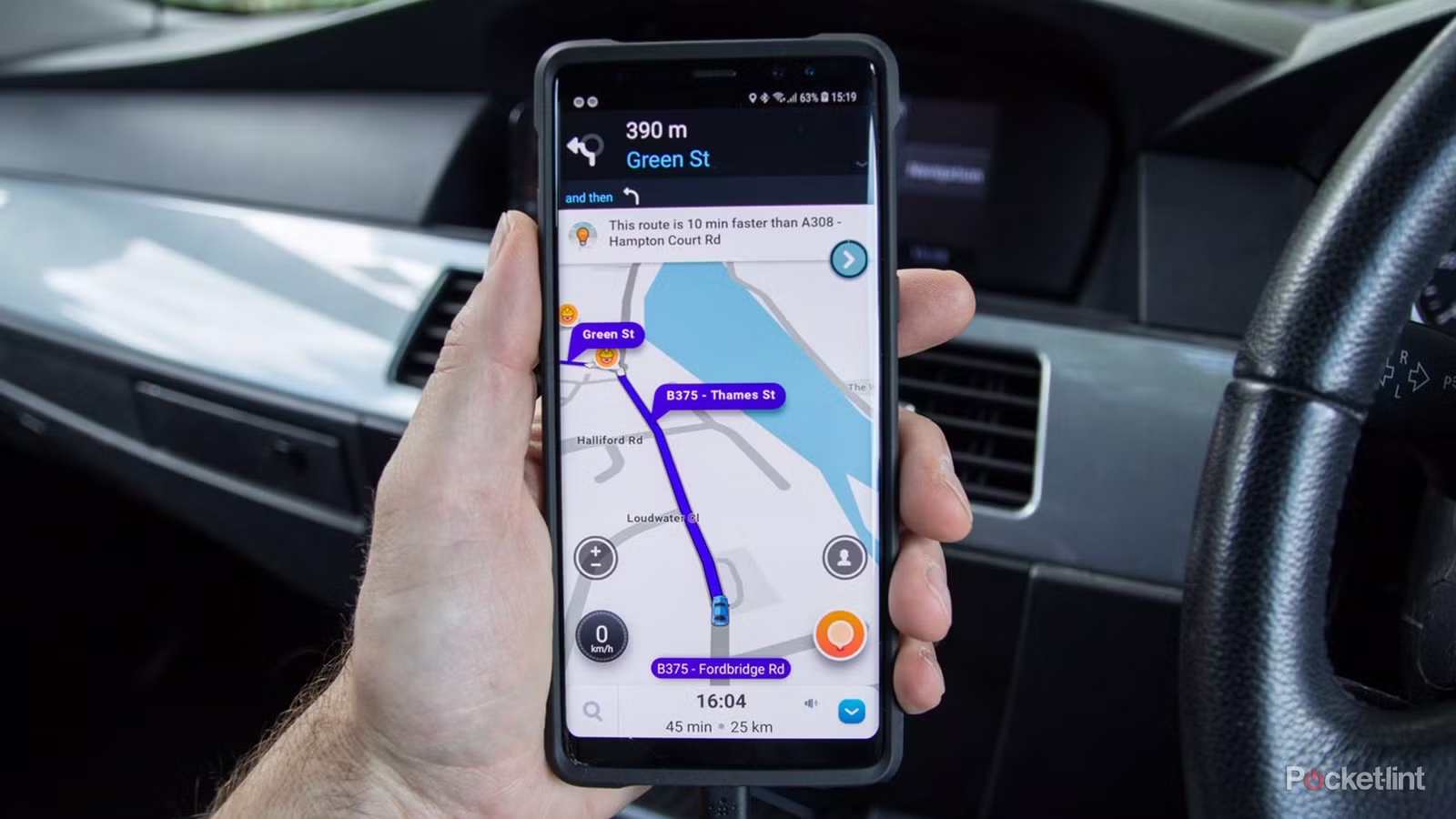
If your GPS’s sole mission is to avoid traffic at all costs, the Waze driving app exists for you. The app is engineered around one principle: get drivers from A to B in the shortest time possible, using community data as its weapon.
Real-world testing shows the advantage is measurable. In a 30-trip head-to-head test, Waze arrived first on 18 routes, averaging a 3–5% faster arrival time (roughly 2–7 minutes saved on typical 35–75-minute drives). Where the difference really widens is on congested routes with active incidents—Waze beat Google Maps by up to 10 minutes when accidents or closures were in play.
The speed comes from rerouting. When a traffic jam forms, Waze reroutes at a median latency of 2.1 seconds; Google Maps takes 3.6 seconds. In rush-hour gridlock, that advantage compounds.
Across 30 trips, Waze dynamically rerouted on 28% of routes (often within a minute of a new incident report), while Google Maps rerouted just 15% of the time, typically a few minutes after conditions shifted.
This relentless responsiveness has a trade-off: Waze will send you down residential streets, alleys, or unexpected turns if those routes shave 30 seconds off your ETA.
You get there faster. You just might not recognize the neighborhood.
Who Waze Serves Best
Waze dominates when you’re battling unpredictable urban traffic. Professional drivers, delivery drivers, and people navigating rush hours in major metros report measurable time savings. But in rural areas where Waze user penetration drops below 5% (much of the rural Midwest, Appalachia, and Northern Maine), the app becomes less effective.
Without enough drivers reporting incidents, Waze reverts to historical traffic patterns—and Google Maps, with its satellite-derived flow data, often performs better. In a 2024 test across 14 rural counties, Google Maps achieved 12.7% lower ETA error variance than Waze.
2. Google Maps vs Waze: The Feature Chasm
| Feature | Waze | Google Maps |
|---|---|---|
| Speed & Rerouting | 3-5% faster on average; reroutes at 2.1s median latency; rerouted 28% of trips in testing | Slightly slower; 3.6s reroute latency; rerouted 15% of trips; asks for permission before rerouting |
| ETA Accuracy | More variable; shifts with each reroute; less stable on longer trips | More stable and accurate overall; 12.7% lower ETA error variance in rural areas |
| Speed Limit Display | Accurate across nearly all road types | Inconsistent; shows incorrect limits in some regions (e.g., showed 80km/h when actual was 100km/h) |
| Toll Information | Shows exact prices | Only indicates tolls are present, not cost |
| Traffic & Incident Reporting | Community-driven real-time reports (accidents, hazards, police, speed cameras); faster reporting | Algorithm-based with user reports; slower incident detection; no police/camera reporting |
| Walking Directions | Not supported; workarounds only | Full native support with Live View (AR navigation) |
| Offline Maps | Not available; requires data connection | Can download maps for offline use |
| Place Discovery | Minimal (gas stations, parking, rest stops only) | Rich data (restaurants, shops, reviews, ratings, menus, booking) |
| Multi-Modal Transit | Driving only | Driving, walking, cycling, public transit |
| Android Auto Integration | Basic; functional but less integrated; Nov 2025 update improved phone-to-car start | Deep integration; Gemini AI co-pilot for restaurant/parking/reminders |
| Interface Design | Clean, simple, cartoon-like with animated Wazers | More complex but feature-rich; professional design |
| Best For | Urban commuters; delivery drivers; high-traffic areas; time optimization | General users; long road trips; multi-modal trips; place discovery; rural driving |
This is where the gap widens dramatically.
Google Maps isn’t just a driving app. It’s a platform. You can find restaurants, check real-time wait times, view menus, read reviews, book tables, and plan multi-leg trips using public transit, cycling, or walking.
You can download offline maps for areas without cell coverage. You can zoom into Street View and see storefronts before you arrive. It handles Uber integration, allows multiple stops per trip, and—as of 2025—uses Gemini AI to summarize user reviews and act as a co-pilot for route optimization.
Waze, by contrast, is a specialist. It shows gas stations, parking, and rest stops, but its business data is sparse. It doesn’t support walking directions, public transit, or cycling—it’s for drivers, period.
You can’t download maps for offline use. No Street View. No restaurant discovery. It does one thing: route you around traffic.
This specialization shows in the interface.
- Waze is cleaner, simpler, and more intuitive with fewer elements cluttering your screen. Google Maps can feel overwhelming. On simplicity alone, Waze wins.
- But if you’re driving to an unfamiliar neighborhood and want to know whether there’s a good taco spot near your destination, Google Maps is your app.
3. Waze Maps Driving Directions vs Google Maps: Rerouting Philosophy
Here’s a subtle but important distinction in how these apps handle route changes:
- When Google Maps finds a faster route, it asks your permission before switching. You see a notification: “Faster route available. Take it?” You decide.
- When Waze finds a faster route, it just takes it—no questions asked. The app reroutes automatically, assuming you care only about arriving on time.
For some drivers, this is liberating. For others, it’s unsettling.
Testing shows that Google Maps’ approach reduces what researchers call “attention residue,” which is the cognitive load that lingers when you have to reprocess a new route. But for people optimizing purely for time, Waze’s aggressive rerouting wins.
Both apps use real-time data, but they interpret it differently.
Waze relies heavily on user reports (traffic jams, accidents, police, speed traps). Google Maps uses a mix of live user data and algorithmic predictions based on historical patterns and traffic agency data.
In highly congested urban areas, Waze’s user-reported data is faster and more granular. In areas with fewer Wazers, Google Maps’ predictive models are more reliable.
4. Accuracy and Speed Limit Reliability
When you need to trust your app’s speed reading—especially near speed cameras—the results get specific.
Testing revealed that Waze displays speed limits accurately across nearly all road types. Google Maps, however, shows inconsistent speed limit data (a regional limitation imposed by Google in some areas). In one test, Google Maps showed 80 km/h on a road where the actual limit was 100 km/h. Waze consistently matched posted limits.
For toll costs, Waze shows exact prices; Google Maps only indicates that tolls are present. If avoiding or confirming specific toll costs matters on your route, Waze provides clearer information.
That said, ETA accuracy (estimated arrival time) slightly favors Google Maps overall. Google’s algorithms integrate road type, traffic light counts, and fuel efficiency, producing predictions that are typically more stable and accurate on longer, simpler routes. Waze prioritizes speed over ETA precision—its predictions can vary more because they shift with every reroute decision.
5. Difference Between Waze and Google Maps: Traffic and Incident Reporting
Real-time incident reporting is where these apps truly diverge.
Waze’s community engine lets drivers report traffic jams, accidents, road hazards, construction, police sightings (including stealth speed traps), mobile phone detection cameras, and weather. As you drive, Waze asks, “Is this hazard still here?” Your confirmation or dismissal trains the network.
Waze has built a reputation for this, as it’s been crowdsourcing incident data longer than Google has. The system works.
Reddit users consistently cite Waze’s speed limit and toll displays as more up-to-date than Google’s, partly because the Waze community updates road info more quickly when changes occur.
Google Maps has added incident reporting, but it lacks Waze’s depth and community responsiveness. You can report traffic or accidents, but the interface isn’t very intuitive, so fewer people do. Mobile phone detection camera reporting? Not available on Google Maps yet.
However, research shows a nuance: Waze users are more emotionally negative about reliability despite the app’s real-time capabilities. According to sentiment analysis of app reviews, Waze reliability concerns drag down user satisfaction more than they do for Google Maps users—even though Waze’s actual performance on incident detection is superior. This suggests users expect even more from Waze’s real-time features than the app currently delivers.
i. Waze Walking Directions: A Workaround, Not a Feature
This matters if you occasionally need to navigate on foot.
Waze simply doesn’t support Waze walking directions. It’s a driving app, full stop.
Workarounds exist: you can toggle “Avoid Highways” and “Avoid Toll Roads,” set routing to “Shortest” distance rather than fastest time, and use Waze’s voice navigation while walking. This works, but it’s hacky and not designed for pedestrians.
Google Maps has native walking directions, Live View (AR turn-by-turn overlay), and actual pedestrian routing that accounts for sidewalks, crossings, and foot traffic patterns. If you alternate between driving and walking navigation, Google Maps is the practical choice.
ii. Is Waze Better Than Google Maps? Context Matters
In a vacuum, the answer depends entirely on your driving life.
Choose Waze if:
- You commute in an urban area during rush hours
- You drive the same routes repeatedly (Waze learns and optimizes)
- You value saving every possible minute over ride comfort
- You want reliable speed limit and toll information
- You like the simplicity of a driver-only interface
Choose Google Maps if:
- You drive longer highway routes where stability beats aggressive rerouting
- You need offline navigation
- You occasionally walk, bike, or use transit
- You want rich place discovery (restaurants, shops, reviews)
- You’re driving in rural areas with low Waze penetration
- You need to download maps for areas with poor cell coverage
For most people? Google Maps is the default. It does almost everything adequately and some things brilliantly.
But if you’re stuck in urban traffic regularly, running a delivery business, or obsessed with shaving commute time, Waze route planner delivers measurable results—roughly 3–5% faster arrivals in real-world testing.
In one expert assessment, when a traffic jam forms, Waze achieves a 9.3% reduction in median travel time versus Google Maps and Apple Maps, making it the clear winner for time-obsessed drivers navigating dense urban centers.
iii. Waze vs Google Maps Android Auto: Hands-Free Reality
Both apps support Android Auto, but the implementation differs.
- Waze on Android Auto: Works wirelessly or via USB (requires Android 11+). A November 2025 update let Waze users start navigation from their phone while the display is connected to the car, closing a gap where you previously had to use voice commands only. The app is functional but feels less integrated than Google Maps’ ecosystem.
Google Maps on Android Auto: Deeper integration. Voice control is richer, and Gemini AI integration means you can ask the app to find vegan restaurants along your route, check parking availability, add calendar reminders, or share your ETA—all without touching the screen. The experience feels more like a co-pilot.
For pure navigation, both work. For the broader experience, Waze vs. Google Maps Android Auto favors Google’s more sophisticated integration
6. Is Waze the Best Navigation App? A Verdict
“Best” is an incomplete word. Is Waze the best navigation app for drivers in high-traffic urban environments who want to save time at all costs? Yes. Is it the best for everyone else? No—Google Maps owns that crown.
If I could only install one app, I’d choose Google Maps. It’s more versatile, offline-capable, and reliable. But I’d install Waze immediately after, especially if I were spending my day navigating city traffic. The data shows it works. Real-world testing confirms it. And for the cost of a few seconds of cognitive load from rerouting, you get a tangible time savings.
The apps aren’t competitors anymore—they’re complements. They’re owned by the same company. Use both, know the difference, and let the context of your trip decide which one guides you.
Common Questions People Ask About Navigation Apps
1. Does Waze use the same data as Google Maps?
Both are Google subsidiaries and share some traffic data. But Waze emphasizes real-time, user-reported incident data. Google Maps leans on historical patterns and algorithmic predictions. The philosophies differ, even if the raw data source is sometimes the same.
2. Can I use Waze offline?
No. Waze requires a data connection for routing, rerouting, and real-time updates. Google Maps allows offline map downloads
3. Is Waze more private than Google Maps?
Both collect location data. Neither is a privacy-first choice. Apple Maps is generally considered more privacy-focused, though it has fewer features.
4. Does Waze work everywhere?
Waze works globally, but its effectiveness depends on user density. Major cities, highways, and developed regions have robust community reporting. Rural and developing areas have less coverage.
5. Which app is faster for long road trips?
Google Maps. On long, simpler routes with minimal disruptions, both apps are nearly identical in arrival time. Google Maps’ stable routing and ETA predictions feel less stressful on multi-hour drives.
6. Can I use Waze for iOS/iPhone?
Yes, Waze is available on iOS, with CarPlay support. The experience is nearly identical to Android.
The Tech Junction is the ultimate hub for all things technology. Whether you’re a tech enthusiast or simply curious about the ever-evolving world of technology, this is your go-to portal.