
Students are drowning in lecture recordings. Creators sit on hours of unedited video. Knowledge workers live inside PDFs and meeting notes.
Tools like Turbo AI promise to turn all of that into clean notes, quizzes, and study packs in a few minutes instead of a lost weekend. The question isn’t “is that cool?” — it’s “does it actually work, how much does it cost, and is it the right tool for you?”
This guide walks through what is Turbo AI, how it works in the real world, what users love and hate about it, how much you’ll actually pay, and which alternatives are worth considering if you want the best AI note taker for your stack.
What is Turbo AI?
Turbo AI (often branded as TurboLearn AI or Turbo AI – Notetaker) is an AI note taker and study workspace built to turn lectures, PDFs, web pages, and recordings into structured notes, flashcards, quizzes, and even podcast-style audio.
You’ll see it under a few names and domains:
- The mobile app “Turbo AI – Notetaker” on [Google Play] and the [App Store]
- The web platforms turbolearn.io and turbolearn.ai, which present it as an all‑in‑one AI study tool and workspace
- Marketing that refers to turbo learn / TurboLearn AI as the broader product and “Turbo AI” as the engine that processes your content
Behind the branding, the promise is simple:
Upload content → get structured notes, flashcards, quizzes, and audio you can actually revise from.
How Turbo AI Works (In Plain Language)
Here’s the typical flow for a student or creator using Turbo AI today, based on its own docs and independent Turbo AI review write-ups.
1. Capture content
- Record a live lecture or meeting inside the app
- Paste a YouTube link or upload a video — this is where it acts as a video note taker or video to notes ai engine
- Upload PDFs, slide decks, or long articles
2. Turbo AI processes everything into notes
The engine parses your source, then generates:
- Clean, structured Turbo AI notes with headings, bullets, tables, equations, and emojis
- A searchable transcript if you started from audio or video
This is the core “AI notes generator” experience the platform is known for.
3. Turn notes into active study material
From there, you can trigger:
- Flashcards built from your own notes
- Multiple‑choice quizzes and practice questions
- Summary sections and key‑point lists
- Audio “podcast” versions of your notes for commute listening
4. Study, ask questions, iterate
- Use the built‑in chat to ask clarifying questions about your content, acting as an AI study helper
- Re‑organize notes into folders, courses, or projects
- Share resources with classmates or teams through shared workspaces
In other words, Turbo AI is built less as a simple dictation tool and more as a note-taking AI layer that sits on top of your entire learning workflow.
Turbo AI Features & Real‑World Use Cases
1. AI Note Taking from Lectures, Meetings, and Videos
Turbo AI’s strongest use case is turning long-form content into usable notes. In the app listings, the team describes how it generates “beautifully formatted notes” with diagrams, tables, emojis, and equations, all synced across devices and the web app.
A detailed review on Skywork.ai described using TurboLearn AI to process a 90‑minute lecture and generate notes, flashcards, and a quiz “in under 5 minutes,” calling it an “exceptional time‑saver for text‑ and speech‑heavy content.”
Best for:
- University lectures
- Law and med school readings
- Corporate training sessions
- Long client or team meetings
If you’re currently pausing a video every 10 seconds to type notes, Turbo AI gives you back a huge chunk of your week.
2. Flashcards, Quizzes, and Active Recall
Once the notes are in, Turbo AI can generate:
- Flashcards that mirror the language of your own notes
- Multiple‑choice quizzes and other question formats
- Review cycles based on spaced‑repetition principles
The Skywork reviewer — who stress‑tested TurboLearn AI over a week — rated its flashcards and quizzes 4.8/5, noting that the questions weren’t just random snippets but targeted key ideas and used spaced review that felt similar to Anki, minus the manual setup.
For creators and course designers, a separate review on CoursePlatformsReview pointed out that TurboLearn AI can generate quizzes from uploaded modules, which can then be refined and ported into an LMS.
Best for:
- Students prepping for exams
- Course creators building practice material
- Bootcamp and cohort‑based course operators
3. Podcast‑Style Audio Notes
Turbo AI also converts your notes into podcast‑style audio, so you can listen while commuting, cooking, or at the gym.
Reviewers tend to agree that this feature is helpful but still a bit rough. The Skywork review gave the podcast feature a 3.0/5, praising the idea but noting that the synthetic voice made longer sessions less engaging.
Best for:
- Language learners
- Busy professionals squeezing revision into commutes
- ADHD/neurodivergent learners who benefit from multi‑modal input
4. Chat‑Based Clarification and Coaching
Turbo AI includes an in‑app chat that lets you ask questions about your own content. Instead of searching the web, you’re querying your personal corpus of readings, lectures, and notes.
The same Skywork reviewer rated this chat feature 5.0/5 and compared it to “having a personal, tireless teaching assistant who has perfectly memorized all your course materials.”
A write‑up on OreGate AI (an EdTech review site) echoed this, praising TurboLearn AI’s ability to answer context‑aware questions and generate personalized quizzes from uploaded material.
Best for:
- Law, med, or engineering students dealing with dense material
- Knowledge workers building research dossiers
- Creators building evergreen content libraries from research
5. Collaboration and Workspaces
On the turbolearn.io site, TurboLearn AI pitches shared workspaces, project organization, and dashboards so teams can manage study projects, cohorts, or content development in one place.
For educators, CoursePlatformsReview notes that this can speed up course asset creation — lecture summaries, guided notes, and practice questions — especially when combined with an LMS.
Best for:
- Study groups
- Teaching teams
- Course and membership site owners
Turbo AI Pricing: Plans, Features, and the Real Turbo AI Cost
Pricing has shifted over time, and different reviewers quote slightly different numbers, so it’s worth separating the noisy screenshots from the current ranges.
From recent reviews and TurboLearn‑focused comparisons, here’s a realistic view of Turbo AI cost for individuals:
| Plan | Price (approx.) | What you get |
|---|---|---|
| Free “Starter” | $0 | ~2 hours of audio per month, ~5 quizzes, ~1 PDF upload, ~10 chat messages |
| Pro | Around $5.99–$9.99 / month depending on billing cycle | More lecture hours (often 10–15+), more PDFs, dozens of quizzes, and higher chat limits |
| Unlimited | Around $12.99–$19.99 / month | Much higher or unlimited lecture hours and PDFs, hundreds of quiz questions and large chat quotas |
A 2026 pricing breakdown on Fahimai.com notes three ways to pay — Starter, Pro, and Unlimited — with the Pro plan at about $5.99/month and Unlimited at $12.99/month, plus a roughly 33% discount when billed annually.
Another detailed comparison between Turbolearn.ai and TurinQ.com confirms similar pricing bands and calls out that some perks (like community forum access and podcast generation) may sit behind higher tiers.
Key takeaway on pricing:
- The free tier is fine for testing
- Serious students and creators will almost certainly need Pro or Unlimited
- The actual turbo AI cost will depend on how many hours of content you process each month
Always double‑check the live pricing on the official site or inside the app before committing, as these numbers can move as the tool matures.
Turbo AI Review: What Users and Creators Actually Say
You don’t need another fluffy Turbo AI review. You need to know if people who bet grades, revenue, or client work on this thing still use it three months later.
Here’s what real users and reviewers say, pulled from public reviews and independent breakdowns.
Testimonials and User Stories
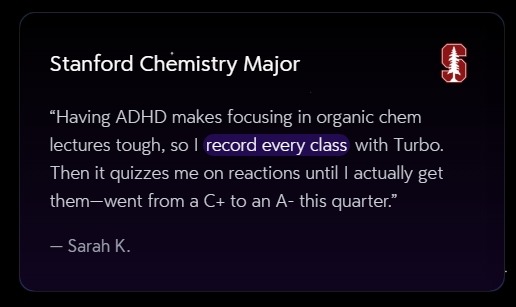
On the official Turbo AI site, users describe very concrete gains:
Sarah K., Stanford Chemistry Major:
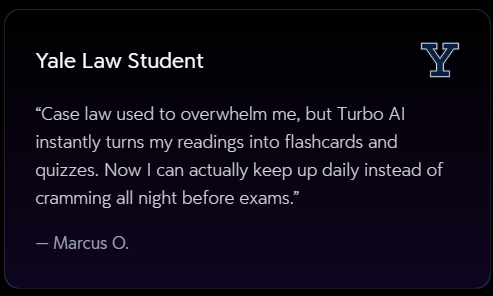
Marcus O., Yale Law Student:
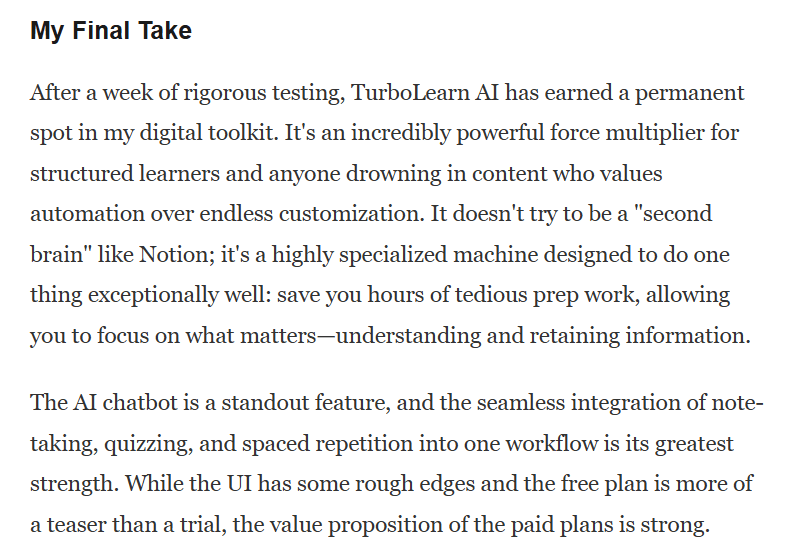
An in‑depth reviewer on Skywork.ai used TurboLearn AI for a week on a research‑heavy project called “The Future of AI in Education.” They reported that it turned a messy folder of sources into notes, flashcards, and quizzes in minutes instead of hours, and said it “earned a permanent spot in my digital toolkit.”
Another long-form review on ToolsForHumans.ai praised TurboLearn AI’s ability to convert videos, PDFs, and websites into summaries and practice material, especially for students and lifelong learners who juggle many formats.
On Google Play and the App Store, users regularly praise:
- How quickly it produces notes, quizzes, flashcards, transcripts
- The variety of outputs: document‑style notes, podcasts, quiz mode, chat, and flashcards in one AI study tool
- The value compared to separate tools for transcription, note‑taking, and flashcards
The Downsides: Bugs, UX, and Heavy Content
It’s not all roses. Multiple reviews — both from users and pro reviewers — mention recurring pain points:
Bugs and glitches:
App store reviews mention that the mobile app can feel clunky at times, especially on tablets, with difficulty editing notes and missing flashcard study modes compared to the browser experience.UI rough edges:
The Skywork reviewer praised the core engine but called out that the interface “feels underbaked in places,” even if it’s generally easy to navigate.Visual and complex content issues:
Reviews on Skywork and CoursePlatformsReview note that TurboLearn AI struggles to accurately parse complex tables and graphs inside PDFs, often turning them into jumbled text. Quizzes can also be repetitive or simplistic in certain subjects.Free plan is limited:
Several reviewers describe the free tier as more of a teaser than a serious plan, given the tight caps on lecture hours, uploads, and quiz questions.
On Trustpilot, early reviews of Turbolearn.ai are mixed — some users praise the time saved and helpful support, while others mention bugs and technical glitches that interfere with long study cycles.
Bottom line on this Turbo AI review:
Turbo AI is extremely strong for turning lectures and text‑heavy content into structured, active study material. If your workflow is video‑ and reading‑heavy, it can feel like cheating (the good kind).
But you should expect to clean up complex tables, accept the occasional bug, and probably pay for a Pro or Unlimited plan if you rely on it daily.
Turbo AI vs Alternatives: Who Else Is in the Game?
No tool exists in a vacuum. If you’re shopping for an AI study tool, you should compare Turbo AI with a few serious contenders.
Here are some realistic alternatives, and where each one tends to win:
| Tool | Best for | Why people pick it |
|---|---|---|
| Turbo AI / TurboLearn AI | Students and creators who live in lectures, PDFs, and videos | Strong at converting multi‑format content into notes, flashcards, quizzes, and audio; tight focus on study workflowsskywork+3 |
| TurinQ.com | Instructors, test‑prep creators, and schools | Strong question‑generation tools, grading, LMS‑friendly exports, and a generous free trial; often better value per “AI credit” than Turbolearn.ai, according to a direct comparison. |
| Notion with AI features | Knowledge workers and power users | Combines documents, databases, and AI assistance in one workspace; great if you already run your whole life in Notion. |
| Otter.ai | Meeting‑heavy teams | Very strong live transcription and speaker detection, plus search across meeting history; less focused on flashcards and quizzing. |
| Glean | University students with live lecture needs | Built for recording lectures and annotating them in real time; particularly popular among students with note‑taking accommodations. |
| Quizlet + Q‑Chat | Pure memorization and exam prep | Massive community question bank plus AI‑assisted question practice; less suitable for long meetings or complex project notes. |
If your priority is a focused AI note taker for study content across video, audio, and documents, Turbo AI and TurinQ.com tend to be the top two in this category today. If you mostly need transcription and search for meetings, Otter or Glean may make more sense.
Where Turbo AI Fits in Your Study Stack
So, where does Turbo AI land if you’re trying to build a realistic study AI stack that doesn’t fall apart two weeks into the semester?
i. For Students
Turbo AI is particularly strong if:
- You attend long lectures and don’t want to replay them at 0.75x speed to take notes
- You’re in law, medicine, engineering, or other reading‑heavy programs
- You want a single place to go from raw lecture → notes → flashcards → quizzes → audio
If you combine Turbo AI with a calendar, a basic task manager, and maybe a dedicated flashcard app for high‑stakes exams, you have a serious system without duct‑taping ten different tools.
ii. For Creators and Course Builders
If you’re running a YouTube channel or course business, Turbo AI (and turbo learn.ai more broadly) is handy in a few specific ways:
- Turn long video scripts, webinars, or podcast episodes into lesson notes
- Generate draft quizzes and flashcards for students, then refine them before importing into your LMS
- Keep a shared space where you and your team can shape raw recordings into an actual curriculum
It won’t replace a full authoring tool or LMS, but it removes a lot of the grunt work that keeps courses stuck in the “draft” folder.
iii. For Professionals
Professionals use Turbo AI as:
- A video note taker for internal trainings and recorded calls
- A meeting recorder that produces action‑oriented notes and follow‑up lists
- A workspace where long whitepapers and dense PDFs become digestible summaries and talking points
If most of your day is “consuming” content to make decisions, Turbo AI can be the AI study helper you wish you had in school.
How to Choose the Right AI Study Tool
Here’s the thing: no app gives you good grades or strong content on its own. Your choice of tool should match your actual habits.
Use this checklist:
1. Content types you use most
- Lots of video and audio → Turbo AI and TurinQ.com are strong picks
- Mostly text and knowledge management → Notion with AI assistance might be better
- Mostly live lectures → Glean or Turbo AI, depending on your need for flashcards and quizzes
2. Budget and turbo ai cost
- If you can’t justify at least $5–$10/month, stick with the free tier plus something like Quizlet
- If you’re in a high‑stakes program (law/med) or building a real course business, Pro or Unlimited pricing is very reasonable relative to the time saved
3. Tolerance for bugs and cleanup
- If you need pixel‑perfect output from complex tables and diagrams, be ready to fix things manually in Turbo AI or use it mainly for lecture and reading material
- If you’re okay with “80% there, I’ll tidy the rest,” Turbo AI is a good match
4. Need for collaboration
- If you run cohorts, teams, or study groups, TurboLearn AI’s shared spaces and course‑style structure will matter more to you than to a solo learner.
Final Verdict: Is Turbo AI Worth It?
To pull it all together:
What is Turbo AI?
A focused AI note taker and AI study tool designed to turn lectures, videos, PDFs, and websites into structured notes, flashcards, quizzes, and audio you can actually revise from.Who is it best for?
Students in reading‑ and lecture‑heavy fields, course creators packaging lots of content into structured learning, and professionals who sit through endless meetings and trainings.What are the main trade‑offs?
You get serious time savings and a cohesive workflow, at the cost of occasional bugs, imperfect handling of complex tables/visuals, and a free tier that runs out fast.How does it compare?
Turbo AI (and turbo learn.ai as a platform) is one of the strongest options in this category today, with TurinQ.com a close competitor for creators and educators who care about question banks, grading, and LMS exports.
If you’re looking for the best AI note taker for mixed content — lectures, PDFs, videos, and web pages — Turbo AI deserves a serious trial run. Use the free Starter plan to process a real week of your work or classes.
If you look up seven days later and your notebooks are tidier, your quizzes feel more targeted, and you’re no longer re‑listening to the same lecture three times, don’t be surprised!
Frequently Asked Questions
What happened to TurboLearn? Why the name change to Turbo AI?
How do I record lectures and turn them into notes?
Is Turbo AI free to use?
Yes! Turbo AI offers a generous free tier that includes note generation, flashcards, and quizzes. You can upgrade to unlock unlimited features and advanced AI capabilities.
Can I create flashcards from YouTube videos?
Yes! Just paste any YouTube link – lecture recordings, Khan Academy, Crash Course – and Turbo AI generates flashcards from the video content. Great for visual learners who prefer video lectures.
Can I convert my PDF textbooks into study materials?
Yes! Upload any PDF – textbooks, research papers, lecture slides – and Turbo AI instantly creates notes, flashcards, and quizzes from them. Perfect for when you need to study a 50-page chapter but only have an hour.
The Tech Junction is the ultimate hub for all things technology. Whether you’re a tech enthusiast or simply curious about the ever-evolving world of technology, this is your go-to portal.